# 说在前面

本文涉及 WebRTC 最基础的部分,最终实现直播的类似效果。预计后面会和 Electron 系列文章合并。

# 相关资源

  • MDN 上的 WebRTC
  • html5rocks 上的 WebRTC
  • 信令服务器
  • coturn 服务器
  • SocketIO

# 本篇内容

展示 WebRTC 的连接过程、搭建信令服务器、编译 coturn 服务器

# 关于 WebRTC

WebRTC 是谷歌推出的一项十分复杂的音视频项目,包含了网络通信、音视频处理、STUN/TURN 技术等。尽管内核技术很多,但是给出的 API 相当丰富且实用。
WebRTC 最大的特点在于只依靠浏览器就可实现通信,且由于基于 UDP 所以通信延时很短(0.5s-1s)并且抗弱网络性能很强,十分适合用在音视频连麦这种应用场景上。并且由于使用 STUN 技术,一旦连接成功,将不需要中间服务器,能有效降低媒体服务器的开销。
WebRTC 是个十分庞大的工程,本人能力不够无法从源码层面学习,只能通过简易的 JavaScript 接口来体验这一技术带来的体验。

# 简易关系图
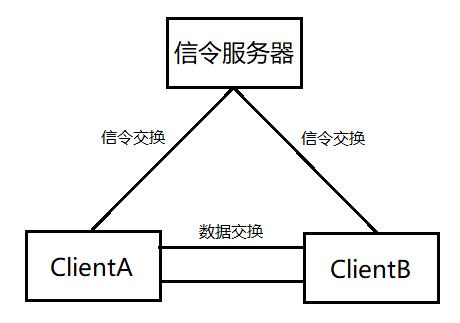
简易关系图

  • 图中省略了 NAT
  • 信令服务器作为两端没有建立连接前的交流媒介
  • 一旦通过交换令牌最终建立了连接,便不再需要信令服务器
  • 两端实际上是对等的,没有主次之分,A 可以给 B 传递音视频,B 也可以给 A 传递音视频。不过这个可以从编程方面人工规定

# 信令服务器

双方一般都在 NAT 后,无法直接通信,而是需要一个具有公网 IP 的服务器作为双方交流的中继,此时这个服务器被称为 信令服务器
信令服务器的责任就在于交换双方的 offer、answer 以及 candidate,只要能实现这一流程的都可以叫做信令服务器,所以实现的技术并没有限制。从需要主动推送消息这一要求来看,是 WebSocket 类技术比较适合,为降低实现难度,选择二级封装的 SocketIO 作为核心通信技术

# 信令服务器代码 (Node.js)

1
2
3
4
5
6
7
8
9
10
11
12
13
14
15
16
17
18
19
20
21
22
23
24
25
26
27
28
29
30
31
32
33
34
35
36
37
38
39
40
41
42
43
44
45
46
47
48
49
50
51
52
53
54
55
56
57
58
59
60
61
62
63
64
65
66
67
68
69
70
71
72
73
74
75
76
77
78
79
80
81
82
83
84
85
86
87
88
89
90
91
92
93
94
95
96
97
98
99
100
101
102
103
104
105
106
107
108
109
110
111
112
113
114
115
116
117
const { createServer } = require("http");
const { Server } = require("socket.io");
const port = 62352 // SocketIO使用的端口号
const httpServer = createServer();
const io = new Server(httpServer, { cors: {
origin: ["http://127.0.0.1:5500", "http://10.1.184.88:5500"],
methods: ["GET", "POST"],
allowedHeaders: ["Stream-Danmuku"],
credentials: true
} });// 解决跨域问题
httpServer.listen(port);
let users = {} // 保存在线用户连接

console.log(`SocketIO is listening on Port: ${port}`);

io.engine.on("connection_error", (err) => {
console.log(err.req); // the request object
console.log(err.code); // the error code, for example 1
console.log(err.message); // the error message, for example "Session ID unknown"
console.log(err.context); // some additional error context
});
io.sockets.on('disconnect', (o) => {
console.log(`Disconnected from Client, id=${o.id}`);
})
io.sockets.on('connection', (socket) => {
console.log(`Connected to Client, id=${socket.id}`);
function log(){
const array = ['>>> Message from server: '];
for (var i = 0; i < arguments.length; i++) {
array.push(arguments[i]);
}
socket.emit('log', array);
console.log(array)
}

socket.on('message', (message) => {
log('Got message:', message);
// for a real app, would be room only (not broadcast)
socket.broadcast.emit('message', message);
});

socket.on('login', (data) => {
// 记录下用户名对应的连接对象
log(`User logged in as ${data.name}`)
if(users[data.name]) {
socket.emit('login', { success: false })
} else {
users[data.name] = socket;
socket.name = data.name;
socket.emit('login', { success: true })
}
});
socket.on('offer', data => {
log('Sending offer to', data.name);
let conn = users[data.name];
if(conn){
socket.otherName = data.name;
conn.emit("offer", {
offer: data.offer,
name: socket.name
});
}
});
socket.on('answer', data => {
log('Sending answer to', data.name);
let conn = users[data.name];
if(conn){
socket.otherName = data.name;
conn.emit("answer", {
answer: data.answer
});
}
});
socket.on('candidate', data => {
log('Sending candidate to', data.name);
let conn = users[data.name];
if(conn){
socket.otherName = data.name;
conn.emit("candidate", {
candidate: data.candidate
});
}
});
socket.on('requestOffer', data => {
log('Sending requestOffer to', data.name);
let conn = users[data.name];
if(conn){
socket.otherName = data.name;
conn.emit("requestOffer", { from: socket.name });
}
});
socket.on('leave', data => {
log('Disconnecting user from', data.name);
let conn = users[data.name];
if(conn != null){
socket.otherName = data.name;
conn.emit("leave");
}
});
socket.on('clear', data => {
log('Get Clear Order');
users = []
});
socket.on('close', () => {
if(socket.name){
delete users[socket.name];
if(socket.otherName){
log('Disconnecting user from', socket.otherName);
var conn = users[socket.otherName];
conn.otherName = null;
if(conn){
conn.emit('leave');
}
}
}
})
});

# 说明

  1. 不可避免的会发生跨域问题,代码中也解决了这个问题,有关更详细的回答请见 SocketIO 官方文档
  2. 代码中实现了一对一的 Offer、Answer 以及令牌的交换

运行起来之后就实现了信令服务器的搭建

# STUN/TURN 服务器

STUN 以及 TURN 都是穿越 NAT 的技术(协议),STUN 一旦连接成功将不需要中转服务器但会受到 NAT 类型的限制(大部分时候是可以的)而 TURN 技术则是依赖中转服务器进行数据交换,几乎没有失败的可能但是受限于中转服务器的带宽。二者各有利弊,WebRTC 提供了两种服务器的配置,当 STUN 无法打洞成功时,将会启用 TURN 连接以保证能够正常连接。

  • 协议本身过于复杂,不建议手动构建。
  • WebRTC 使用的 STUN 协议:RFC 8489 TURN 协议:RFC 8656
  • 详细聊请见第三篇文章

# coturn 穿透服务器

  • coturn 是一款开源服务器,实现了 STUN 以及 TURN 服务器以及 ICE 信令交换系统,并提供了 WebUI。
  • 安装配置参考其他大佬文章 https://www.jianshu.com/p/59ba50b5f71d
  • Windows 用户可以下载这份我编译好的

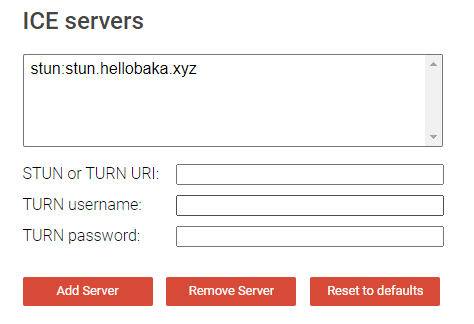
# 验证穿透服务器是否搭建成功

验证网址
file

  • 验证 STUN 服务器时,只需要填写第一栏: stun:域名
  • 验证 TURN 服务器时,需要三栏都填: turn:域名 coturn 配置中的用户名与密码
  • 点击下方的 Add Server
  • 之后点击下方的 Gather candidates 即可
    file
    只要图中出现了 srflxrelay 即可视为搭建成功

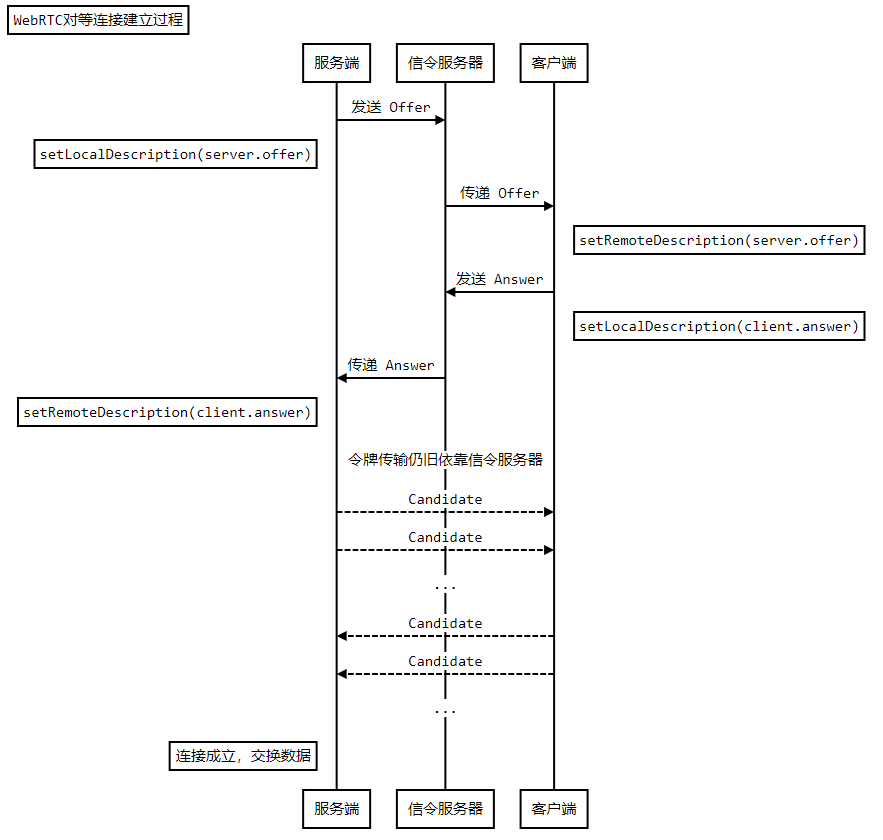
# 对等连接建立过程

为什么不支持时序图

# JS

# 通用 SocketIO 初始化、事件分发

1
2
3
4
5
6
7
8
9
10
11
12
13
14
15
16
17
18
19
20
21
22
23
24
25
26
27
28
29
30
31
32
33
34
35
36
37
38
39
40
41
42
43
44
45
46
47
48
49
50
51
52
53
54
55
56
57
58
59
60
61
62
63
64
65
66
67
68
69
70
71
72
73
74
75
76
77
78
79
80
81
82
83
84
85
86
87
88
89
90
91
92
93
94
95
96
import io from "../node_modules/socket.io-client/dist/socket.io.esm.min.js";

const connection = new io('http://***.***.***.198:62352', {
withCredentials: true,
extraHeaders: {
"Stream-Danmuku": "abcd"
}
});
const configuration =
{
iceServers:
[
{
urls: "stun:stun.hellobaka.xyz",
},
{
urls: "turn:turn.hellobaka.xyz",
username: "a***",
credential: "b**"
},
]
};

const yourConnection = new RTCPeerConnection(configuration);
const loginPage = document.querySelector('#login-page'),
usernameInput = document.querySelector('#username'),
loginButton = document.querySelector('#login'),
callPage = document.querySelector('#call-page'),
callButton = document.querySelector('#call'),
hangUpButton = document.querySelector('#hang-up'),
Video = document.querySelector('#streamVideo'),
theirUsernameInput = document.querySelector('#their-username');
callPage.style.display = 'none';

let stream,
canPlay = false,
name = '';

let connectedUser = ''

loginButton.addEventListener('click', function () {
name = usernameInput.value;
if (name.length > 0) {
send("login", { name });
}
});

hangUpButton.addEventListener('click', function () {
send("leave");
onLeave();
});
// var connection = new io('http://127.0.0.1:6235');
connection.on("connect", () => {
console.log(`Connected to Server, id=${connection.id}`);
});

connection.on("disconnect", () => {
console.log(`Disconnect from Server`);
});
connection.on('candidate', data => {
onCandidate(data.candidate);
})
connection.on('leave', data => {
onLeave();
})

connection.on('connect_error', (e) => {
console.log(e);
});
connection.on('login', data => {
onLogin(data.success);
})
async function onCandidate(candidate) {
await yourConnection.addIceCandidate(new RTCIceCandidate(candidate));
console.log(candidate);
};

function onLogin(success) {
if (success = false) {
alert('Login failed, Please try a different name,');
} else {
loginPage.style.display = 'none';
callPage.style.display = 'block';
}
};

function send(type, message) {
if (connectedUser) {
message.name = connectedUser;
}
console.log(`type: ${type}, msg: ${JSON.stringify(message)}`);
connection.emit(type, message);
}
document.querySelector('#clear').onclick = function (e) {
connection.emit('clear')
}

# 服务端

1
2
3
4
5
6
7
8
9
10
11
12
13
14
15
16
17
18
19
20
21
const streamButton = document.querySelector('#stream')
connection.on('answer', data => {
onAnswer(data.answer);
})
connection.on('requestOffer', async data => {
connectedUser = data.from;
var offer = await yourConnection.createOffer();
send("offer", { offer });
await yourConnection.setLocalDescription(offer);
console.log('setLocalDescription ', offer);
})

function onAnswer(answer) {
yourConnection.setRemoteDescription(new RTCSessionDescription(answer)).then(()=>console.log('setRemoteDescription ', answer))
.catch((err) => console.log(err));
};

function onLeave() {
connectedUser = null;
yourConnection.close();
};

# 客户端

1
2
3
4
5
6
7
8
9
10
11
12
13
14
15
16
17
18
19
20
21
22
23
24
25
26
27
connection.on('offer', data => {
onOffer(data.offer, data.name);
})

async function onOffer(offer, name) {
connectedUser = name;
console.log('onOffer', offer);
await yourConnection.setRemoteDescription(new RTCSessionDescription(offer));
console.log(yourConnection.remoteDescription.sdp);
var answer = await yourConnection.createAnswer();
await yourConnection.setLocalDescription(answer);
console.log(yourConnection.localDescription.sdp);
send('answer', { answer: answer });
console.log('fin Offer');
};
callButton.addEventListener('click', function () {
var theirUsername = theirUsernameInput.value;
if (theirUsername.length > 0) {
yourConnection.onaddstream = function (e) {
Video.srcObject = e.stream;
};
RequestOffer(theirUsername);
}
});
async function RequestOffer(theirUsername){
send('requestOffer', { name })
}

# html

# 服务端

1
2
3
4
5
6
7
8
9
10
11
12
13
14
15
16
17
18
19
20
21
22
23
24
<!DOCTYPE html>
<html>
<head>
<title>WebRTC client</title>
</head>
<body>
<div id="login-page" class="page">
<h2>Login As</h2>
<button onclick="window.location.href='index-Receiver.html'">Receiver</button>
<input type="text" id="username" />
<button id="login">Login</button>
<button id="clear">Clear</button>
<button id="stream">Stream</button>
</div>
<video id="streamVideo" autoplay="autoplay" muted></video>
<div id="call-page" class="page container">
<input type="text" id="their-username" />
<button id="hang-up">Hang Up</button>
</div>
<script src="js/adapter-latest.js"></script>
<!-- <script type="module" src="js/srs.sdk.js"></script> -->
<script type="module" src="js/RTCPeer.js"></script>
</body>
</html>

# 客户端

1
2
3
4
5
6
7
8
9
10
11
12
13
14
15
16
17
18
19
20
21
22
23
24
<!DOCTYPE html>
<html>
<head>
<title>WebRTC client</title>
</head>
<body>
<div id="login-page" class="page">
<h2>Login As</h2>
<button onclick="window.location.href='index.html'">Streamer</button>
<input type="text" id="username" />
<button id="login">Login</button>
<button id="clear">Clear</button>
</div>
<video id="streamVideo" autoplay="autoplay" muted></video>
<div id="call-page" class="page container">
<input type="text" id="their-username" />
<button id="call">Call</button>
<button id="hang-up">Hang Up</button>
</div>
<script src="js/adapter-latest.js"></script>
<!-- <script type="module" src="js/srs.sdk.js"></script> -->
<script type="module" src="js/RTCPeer-Receiver.js"></script>
</body>
</html>

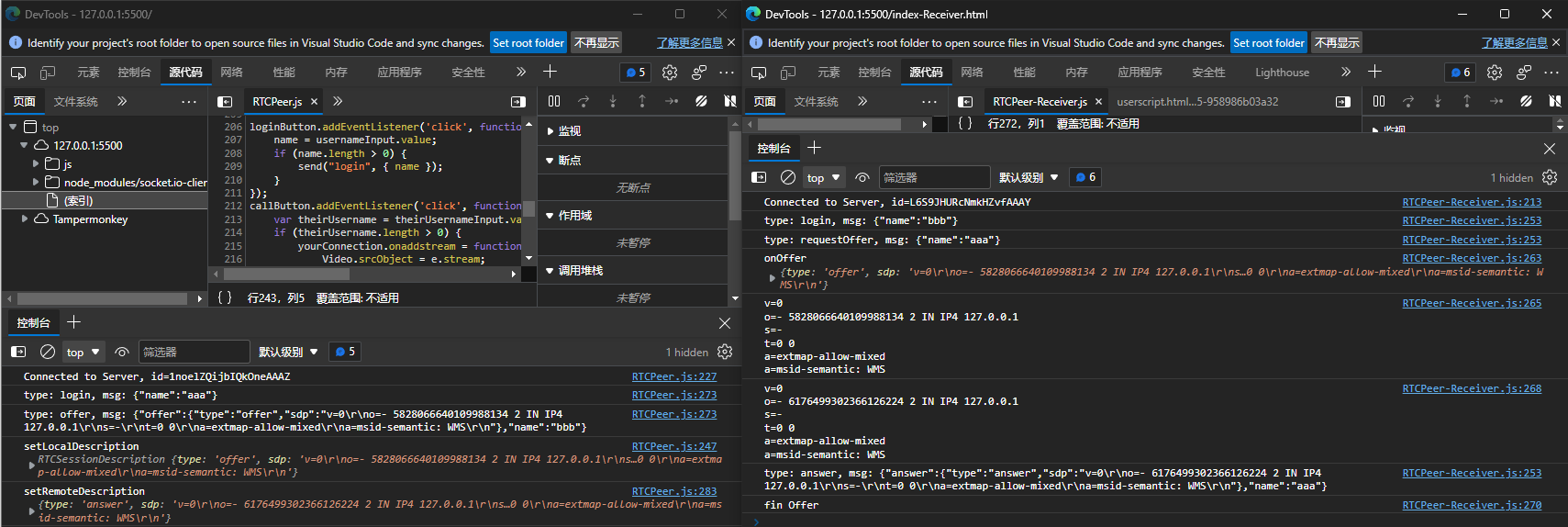
# 执行步骤

  1. 使用服务器之类的运行起网页,比如 VScode 的 Live Server 等
  2. 客户端与服务端使用不同的用户名登录
  3. 客户端填入服务端的用户名,点击 Call 发起通信
  4. 按 F12 打开两者控制台,查看终端输出

# 效果

file

  • 可以看到两端互相传递了信息,当视频信息传输时会产生令牌