# 相关资源
- CefSharp 官方仓库
- 穿越 AppDomain
- 添加 AnyCPU 支持
# 自定义依赖路径
1
2
3
4
5
6
7
8
| var settings = new CefSettings()
{
BrowserSubprocessPath = Path.Combine(appDirectory, "Lib", "CefSharp.BrowserSubprocess.exe"),
LocalesDirPath = Path.Combine(appDirectory, "Lib", "locales"),
ResourcesDirPath = Path.Combine(appDirectory, "Lib"),
CachePath = Path.Combine(appDirectory, "Lib", "Cache")
};
Cef.Initialize(settings, performDependencyCheck: true, browserProcessHandler: null);
|
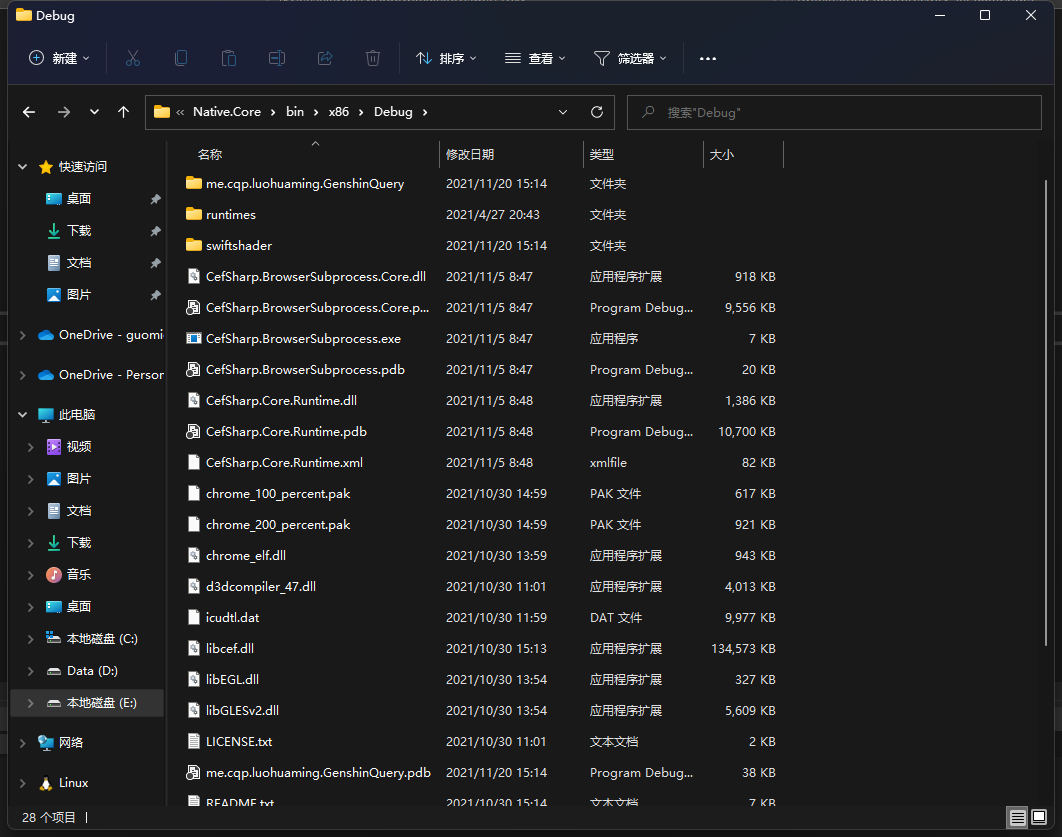
Lib 文件夹为编译后,在程序本体生成的这些散乱文件,把这些全都复制到一个集中的地方
![file]()
# 跨 AppDomain
CefSharp 限制必须在默认 AppDomain ( DefaultAppDomain ) 内初始化以及调用,而由于 OPQBot-Native 使用了 AppDomain隔离 ,导致插件无法正常工作,需要做以下工作找到默认 AppDomain
# 新建类库项目
为透明代理创建一个单独的项目
# 加入 Interop.mscoree 的引用
不知道为什么,这个依赖在引用管理器里找不到,需要自己改 csporj 文件
Interop.mscoree 用于从外部获取应用的所有 AppDomain, C# 限制 AppDomain 获取不到其他 AppDomain 的信息
- 使用文本编辑器打开这个项目的 csporj 文件
- 在有许多
ItemGroup 的地方复制以下文本
1
2
3
4
5
6
7
8
9
10
11
| <ItemGroup>
<COMReference Include="mscoree">
<Guid>{5477469E-83B1-11D2-8B49-00A0C9B7C9C4}</Guid>
<VersionMajor>2</VersionMajor>
<VersionMinor>4</VersionMinor>
<Lcid>0</Lcid>
<WrapperTool>tlbimp</WrapperTool>
<Isolated>False</Isolated>
<EmbedInteropTypes>False</EmbedInteropTypes>
</COMReference>
</ItemGroup>
|
# 创建 DomainHelper.cs
这个类用于寻找 默认AppDomain 、代理初始化以及代理操作 CefSharp实例
实际操作应当在 透明代理 中操作,因为下面代码会在 默认AppDomain 中创建这个对象,这样所有的操作都会发生在 默认AppDomain 中
# 寻找 默认AppDomain
1
2
3
4
5
6
7
8
9
10
11
12
13
14
15
16
17
18
19
20
21
22
23
24
25
26
27
28
29
30
31
32
33
34
35
36
37
38
| public static System.AppDomain DefaultDomain;
public static List<System.AppDomain> GetAppDomains()
{
var appDomains = new List<System.AppDomain>();
var enumHandle = IntPtr.Zero;
var host = new CorRuntimeHostClass();
try
{
host.EnumDomains(out enumHandle);
while (true)
{
object domain;
host.NextDomain(enumHandle, out domain);
if (domain == null) break;
var appDomain = (System.AppDomain)domain;
appDomains.Add(appDomain);
}
return appDomains;
}
catch (Exception)
{
return null;
}
finally
{
host.CloseEnum(enumHandle);
Marshal.ReleaseComObject(host);
}
}
public static void DoInit(string appDirectory, int authCode)
{
if (DefaultDomain == null)
{
DefaultDomain = GetAppDomains().Find(x => x.IsDefaultAppDomain());
}
var o = (BroswerProxy)DefaultDomain.CreateInstanceAndUnwrap(typeof(BroswerProxy).Assembly.FullName, typeof(BroswerProxy).FullName);
o.DoInit(appDirectory, authCode);
}
|
DoInit 函数通过 GetAppDomains 函数寻找到了 默认AppDomain , 并在这个 AppDomain 内创建了透明代理实例
# 创建透明代理
创建一个类,继承 MarshalByRefObject 这个跨越 AppDomain 所需要的类,这个新建的类就用于进行任何自己喜欢的操作,不需要特殊的代码,比如初始化就可以直接这么写
1
2
3
4
5
6
7
8
9
10
11
12
13
14
15
16
17
18
19
20
21
22
| public static ChromiumWebBrowser CefBroswer;
public void DoInit(string appDirectory)
{
CefRuntime.SubscribeAnyCpuAssemblyResolver(appDirectory + "\\Lib");
var settings = new CefSettings()
{
	BrowserSubprocessPath = Path.Combine(appDirectory, "Lib", "CefSharp.BrowserSubprocess.exe"),
	LocalesDirPath = Path.Combine(appDirectory, "Lib", "locales"),
	ResourcesDirPath = Path.Combine(appDirectory, "Lib"),
	CachePath = Path.Combine(appDirectory, "Lib", "Cache")
};
Cef.Initialize(settings, performDependencyCheck: true, browserProcessHandler: null);
CefBroswer = new ChromiumWebBrowser
{
Size = new Size(1290, 3000)
};
CefBroswer.BrowserInitialized += (sender, e) =>
{
SendLog("Load components", "Loaded.");
};
}
|
# 从其他 AppDomain 调用透明代理的方法
在 DomainHelper.cs 创建一个函数,供外部调用,这个函数内部将调用上一步好的透明代理的函数,实现跨域调用函数
1
2
3
4
5
6
7
8
9
| public static Bitmap SnapWeb(string htmlpath)
{
if (DefaultDomain == null)
{
DefaultDomain = GetAppDomains().Find(x => x.IsDefaultAppDomain());
}
var o = (BroswerProxy)DefaultDomain.CreateInstanceAndUnwrap(typeof(BroswerProxy).Assembly.FullName, typeof(BroswerProxy).FullName);
return o.SnapWeb(htmlpath);
}
|
# 后台截图
后台截图是 CefSharp.OffScreen 使用较多的功能之一,也是我使用这个的唯一理由
1
2
3
4
5
6
7
8
9
10
11
12
13
14
15
16
17
18
19
20
21
22
23
24
25
26
27
28
29
30
31
32
33
34
35
36
37
38
39
40
| public Bitmap SnapWeb(string htmlpath)
{
if (CefBroswer.IsBrowserInitialized is false)
return null;
CefBroswer.Load($"file:///{htmlpath.Replace("\\", "/")}");
Bitmap result=null;
CefBroswer.LoadingStateChanged += (sender, ex) =>
{
if (ex.IsLoading is false)
{
var scriptTask = CefBroswer.EvaluateScriptAsync("GetDocumentHeight()");
scriptTask.ContinueWith(async t =>
{
Thread.Sleep(500);
var fullSizePic = await CefBroswer.ScreenshotAsync();
new FileInfo(htmlpath).Delete();
var c = (await CefBroswer.EvaluateScriptAsync("$(\"#height_Tmp\").val()")).Result.ToString();
if (string.IsNullOrWhiteSpace(c))
c = "1290";
int height = Convert.ToInt32(c);
Bitmap bmp = new Bitmap(1290, height);
using (Graphics g = Graphics.FromImage(bmp))
{
g.DrawImage(fullSizePic, new Point(0, 0));
fullSizePic.Dispose();
}
result = bmp;
});
}
};
int timeout = 0;
while (result == null)
{
Thread.Sleep(100);
timeout += 100;
if (timeout >= 1000 * 10)
break;
}
return result;
}
|
此例是从本地加载了网页,因为调用之前就将处理过的网页修改好了放在了固定的位置,函数只需要读取文件之后渲染截图,返回 Bitmap 即可
下面这个 while…… 实话说我也不知道怎么处理比较好,因为上面那个使用了载入完成之后再截图,是个事件,必定不会同步执行,所以放了这么个 while 在阻塞线程,等上面截图完成之后,把图片赋值给 result, while 自然就退出了。当然这个明显不是最佳解决办法……